
R21xx-HP FlexFabric 11900 Network Management and Monitoring Configuration Guide




59
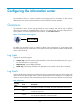
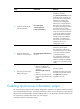
Ste
p
Command
Remarks
3. Configure an output rule for
the monitor terminal.
info-center source { module-name |
default } { console | monitor |
logbuffer | logfile | loghost }
{ deny | level severity }
For information about default
output rules, see "Default log
output rules."
4. (Optional.) Configure the
timestamp format.
info-center timestamp { boot | date
| none }
By default, the timestamp format is
date.
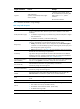
5. Return to user view.
quit N/A
6. Enable log output to the
monitor terminal.
terminal monitor The default setting is enabled.
7. (Optional.) Enable the display
of debug information on the
current terminal.
terminal debugging
By default, the display of debug
information is enabled on the
console and disabled on the
monitor terminal.
8. (Optional.) Set the lowest level
of logs that can be output to
the monitor terminal.
terminal logging level severity
The default setting is 6
(Informational).
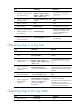
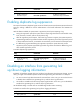
Outputting logs to a log host
Ste
p
Command
Remarks
1. Enter system view.
system-view N/A
2. Enable the information
center.
info-center enable
By default, the information center is
enabled.
3. Configure an output rule
for the log host.
info-center source { module-name |
default } { console | monitor |
logbuffer | logfile | loghost } { deny
| level severity }
For more information about default
output rules, see "Default log output
rules."
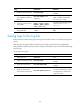
4. (Optional.) Specify the
source IP address for
output logs.
info-center loghost source
interface-type interface-number
By default, the source IP address of
output log information is the primary IP
address of the matching route' egress
interface.
5. (Optional.) Configure
the timestamp format.
info-center timestamp loghost { date
| iso | no-year-date | none }
By default, the timestamp format is
date.
6. Specify a log host and
configure related
parameters.
info-center loghost [ vpn-instance
vpn-instance-name ] { ipv4-address
| ipv6 ipv6-address } [ port
port-number ] [ facility
local-number ]
By default, no log host or related
parameters are specified.
The value of the port-number argument
must be the same as the value
configured on the log host. Otherwise,
the log host cannot receive logs.
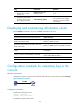
Outputting logs to the log buffer
Ste
p
Command…
Remarks
1. Enter system view.
system-view N/A