
R21xx-HP FlexFabric 11900 Network Management and Monitoring Configuration Guide




60
Ste
p
Command…
Remarks
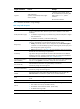
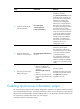
2. Enable the information center.
info-center enable
By default, the information center is
enabled.
3. (Optional.) Enable log output
to the log buffer and set the
buffer size.
info-center logbuffer [ size
buffersize ]
By default, log output to the log
buffer is enabled and the buffer
can store up to 512 logs.
4. Configure an output rule for
the log buffer.
info-center source { module-name |
default } { console | monitor |
logbuffer | logfile | loghost }
{ deny | level severity }
For more information about default
output rules, see "Default log
output rules."
5. (Optional.) Configure the
timestamp format.
info-center timestamp { boot | date
| none }
By default, the timestamp format is
date.
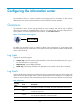
Saving logs to the log file
Perform this task to enable saving logs to the log file at a specific interval, or manually save logs to the
log file.
After the logs in the log file buffer are saved into the log file, the system clears the log file buffer.
The log file has a specific capacity. When the capacity is reached, the system will overwrite earliest logs
with new logs.
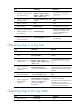
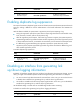
To save logs to the log file:
Ste
p
Command
Remarks
1. Enter system view. system-view N/A
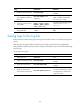
2. Enable the information center.
info-center enable
By default, the information center is
enabled.
3. Enable the log file feature.
info-center logfile enable
By default, the log file feature is
enabled.
4. (Optional.) Configure the
maximum size for the log file.
info-center logfile size-quota size
The default setting is 10 MB.
To ensure normal operation, set the
size argument to a value between
1 MB and 10 MB.