
R21xx-HP FlexFabric 11900 Network Management and Monitoring Configuration Guide




62
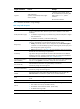
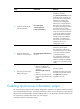
Ste
p
Command
Remarks
1. Enter system view. system-view N/A
2. Enable synchronous
information output.
info-center synchronous
By default, synchronous
information output is disabled.
Enabling duplicate log suppression
The output of consecutive duplicate logs at an interval of less than 30 seconds wastes system and network
resources, making it difficult for network administrators to find useful information and maintain the
device.
With this feature enabled, the system starts a suppression period upon outputting a log:
• During the suppression period, the system does not output logs that have the same module name,
level, mnemonic, location, and text as the previous log.
• After the suppression period expires, if the same log continues to appear, the system outputs the
suppressed logs and the log number and starts another suppression period. The suppression period
is 30 seconds for the first time, 2 minutes for the second time, and 10 minutes for subsequent times.
• If a different log is generated during the suppression period, the system aborts the current
suppression period, outputs suppressed logs and the log number and then the different log, and
starts another suppression period.
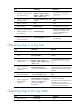
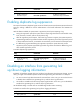
To enable duplicate log suppression:
Ste
p
Command
Remarks
1. Enter system view.
system-view N/A
2. Enable duplicate log
suppression.
info-center logging suppress
duplicates
By default, duplicate log
suppression is disabled.
Disabling an interface from generating link
up/down logging information
By default, all interfaces generate link up or link down log information when the state changes. In some
cases, you might want to disable specific interfaces from generating this information. For example:
• You are concerned only about the states of some interfaces. In this case, you can use this function
to disable other interfaces from generating link up and link down log information.
• An interface is unstable and continuously outputs log information. In this case, you can disable the
interface from generating link up and link down log information.
Use the default setting in normal cases to avoid affecting interface status monitoring.
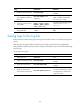
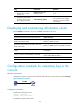
To disable an interface from generating link up/down logging information:
Ste
p
Command
Remarks
1. Enter system view.
system-view N/A