
R21xx-HP FlexFabric 11900 Network Management and Monitoring Configuration Guide



64
[Sysname] info-center source default console deny
To avoid output of unnecessary information, disable all modules from outputting log information to the
specified destination (console in this example) before you configure the output rule.
# Configure an output rule to output to the console FTP logs that have a severity level of at least warning.
[Sysname] info-center source ftp console level warning
[Sysname] quit
# Enable the display of logs on the console. (This function is enabled by default.)
<Sysname> terminal logging level 6
<Sysname> terminal monitor
Current terminal monitor is on.
Now, if the FTP module generates logs, the information center automatically sends the logs to the console,
and the console displays the logs.
Configuration example for outputting logs to a
UNIX log host
Network requirements
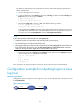
Configure the device to output to the UNIX log host FTP logs that have a severity level of at least
informational.
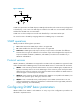
Figure 23 Network diagram
Configuration procedure
Before the configuration, make sure that the device and the log host can reach each other. (Details not
shown.)
1. Configure the device:
# Enable the information center.
<Device> system-view
[Device] info-center enable
# Specify the log host 1.2.0.1/16 and specify local4 as the logging facility.
[Device] info-center loghost 1.2.0.1 facility local4
# Disable log output to the log host.
[Device] info-center source default loghost deny
To avoid output of unnecessary information, disable all modules from outputting logs to the
specified destination (loghost in this example) before you configure an output rule.
# Configure an output rule to output to the log host FTP logs that have a severity level of at least
informational.
[Device] info-center source ftp loghost level informational
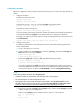
2. Configure the log host: