
R21xx-HP FlexFabric 11900 Network Management and Monitoring Configuration Guide



74
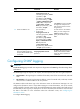
Ste
p
Command
Remarks
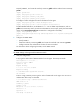
11. Create an SNMPv3 user.
• In non-FIPS mode:
snmp-agent usm-user v3
user-name group-name [ remote
{ ip-address | ipv6
ipv6-address } [ vpn-instance
vpn-instance-name ] ] [ { cipher
| simple } authentication-mode
{ md5 | sha } auth-password
[ privacy-mode { aes128 |
des56 } priv-password ] ] [ acl
acl-number | acl ipv6
ipv6-acl-number ] *
• In FIPS mode:
snmp-agent usm-user v3
user-name group-name [ remote
{ ip-address | ipv6
ipv6-address } [ vpn-instance
vpn-instance-name [ { cipher |
simple } authentication-mode
sha auth-password
[ privacy-mode aes128
priv-password ] [ acl acl-number
| acl ipv6 ipv6-acl-number ] *
If the cipher keyword is specified,
the arguments auth-password
and priv-password are used as
encrypted keys.
To send informs to an SNMPv3
NMS, you must configure the
remote ip-address option to
specify the IP address of the
NMS.
12. (Optional.) Configure the
maximum SNMP packet size
(in bytes) that the SNMP agent
can handle.
snmp-agent packet max-size
byte-count
By default, the maximum size of
SNMP packets that the SNMP
agent can receive and send is
1500 bytes.
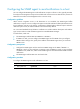
Configuring SNMP logging
IMPORTANT:
Disable SNMP lo
gg
in
g
in normal cases to prevent a lar
g
e amount of SNMP lo
g
s from decreasin
g
device
performance.
The SNMP agent logs Get requests, Set requests, and Set responses, but does not log Get responses.
• Get operation—The agent logs the IP address of the NMS, name of the accessed node, and node
OID.
• Set operation—The agent logs the NMS' IP address, name of accessed node, node OID, variable
value, and error code and index for the Set operation.
The SNMP module sends these logs to the information center as informational messages. You can
configure the information center to output these messages to certain destinations, such as the console
and the log buffer. The total output size for the node field (MIB node name) and the value field (value of
the MIB node) in each log entry is 1024 bytes. If this limit is exceeded, the information center truncates
the data in the fields. For more information about the information center, see "Configuring the
inf
ormation center."
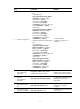
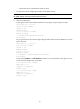
To configure SNMP logging: