
R21xx-HP FlexFabric 11900 Network Management and Monitoring Configuration Guide



82
Configuring NQA
Overview
Network quality analyzer (NQA) allows you to measure network performance, verify the service levels
for IP services and applications, and troubleshoot network problems. It provides the following types of
operations:
• ICMP echo
• UDP echo
An ICMP echo or UDP echo operation sends an ICMP echo request or a UDP packet.
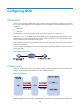
As shown in Figure 29,
the NQA source device (NQA client) sends data to the NQA destination device
by simulating IP services and applications to measure network performance. The obtained performance
metrics include the packet loss and round trip time.
Both ICMP echo and UDP echo operations require the NQA client, but only the UDP echo operation
requires the NQA server.
You can configure the NQA server to listen and respond to specific IP addresses and ports to meet
various test needs.
Figure 29 Network diagram
Collaboration
NQA can collaborate with the track module to notify application modules of state or performance
changes so that the application modules can take predefined actions.
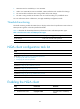
Figure 30 Collaboration
The following describes how a static route destined for 192.168.0.88 is monitored through collaboration: