
R21xx-HP FlexFabric 11900 Network Management and Monitoring Configuration Guide



86
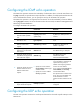
Ste
p
Command
Remarks
2. Create an NQA operation
and enter NQA operation
view.
nqa entry admin-name
operation-tag
By default, no NQA operation is
created.
3. Specify an NQA operation
type and enter its view.
type { icmp-echo | udp-echo } N/A
4. (Optional.) Configure a
description.
description text
By default, no description is
configured.
5. (Optional.) Specify the
interval at which the NQA
operation repeats.
frequency interval
The default setting is 0
milliseconds. Only one operation
is performed.
If the operation is not completed
when the interval expires, the next
operation does not start.
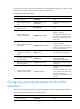
6. (Optional.) Specify the probe
times.
probe count times
By default, an NQA operation
performs one probe.
7. (Optional.) Specify the probe
timeout time.
probe timeout timeout
The default setting is 3000
milliseconds.
8. (Optional.) Specify the TTL for
probe packets.
ttl value The default setting is 20.
9. (Optional.) Specify the ToS
value in the IP packet header
of probe packets.
tos value The default setting is 0.
10. (Optional.) Enable the routing
table bypass function.
route-option bypass-route
By default, the routing table bypass
function is disabled.
Configuring the collaboration function
Collaboration is implemented by associating a reaction entry of an NQA operation with a track entry.
The reaction entry monitors the NQA operation. If the number of operation failures reaches the specified
threshold, the configured action is triggered.
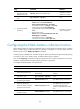
To configure the collaboration function:
Ste
p
Command
Remarks
1. Enter system view.
system-view N/A
2. Create an NQA operation
and enter NQA operation
view.
nqa entry admin-name
operation-tag
By default, no NQA operation is
created.
3. Specify an NQA operation
type and enter its view.
type { icmp-echo | udp-echo } N/A
4. Configure a reaction entry.
reaction item-number
checked-element probe-fail
threshold-type consecutive
consecutive-occurrences
action-type trigger-only
By default, no reaction entry is
configured.
You cannot modify the content of
an existing reaction entry.
5. Exit to system view.
quit N/A