
R21xx-HP FlexFabric 11900 Network Management and Monitoring Configuration Guide



87
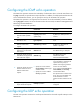
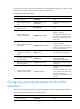
Ste
p
Command
Remarks
6. Associate track with NQA.
See
High Availability
Configuration Guide
.
N/A
7. Associate track with an
application module.
See
High Availability
Configuration Guide
.
N/A
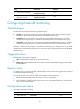
Configuring threshold monitoring
Threshold types
An NQA operation supports the following threshold types:
• average—If the average value for the monitored performance metric either exceeds the upper
threshold or goes below the lower threshold, a threshold violation occurs.
• accumulate—If the total number of times that the monitored performance metric is out of the
specified value range reaches or exceeds the specified threshold, a threshold violation occurs.
• consecutive—If the number of consecutive times that the monitored performance metric is out of the
specified value range reaches or exceeds the specified threshold, a threshold violation occurs.
Threshold violations for the average or accumulate threshold type are determined on a per NQA
operation basis, and threshold violations for the consecutive type are determined from the time the NQA
operation starts.
Triggered actions
The following actions may be triggered:
• none—NQA displays results only on the terminal screen.
• trigger-only—NQA displays results on the terminal screen, and meanwhile triggers other modules
for collaboration.
Reaction entry
In a reaction entry, a monitored element, a threshold type, and an action to be triggered are configured
to implement threshold monitoring.
The state of a reaction entry can be invalid, over-threshold, or below-threshold.
• Before an NQA operation starts, the reaction entry is in invalid state.
• If the threshold is violated, the state of the entry is set to over-threshold. Otherwise, the state of the
entry is set to below-threshold.
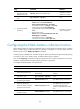
Configuration procedure
To configure threshold monitoring:
Ste
p
Command
Remarks
1. Enter system view.
system-view N/A