
R21xx-HP FlexFabric 11900 Security Command Reference


128
Syntax
dir [ -a | -l ] [ remote-path ]
Views
SFTP client view
Predefined user roles
network-admin
Parameters
-a: Displays the names of the files and sub-directories under a specified directory.
-l: Displays detailed information about the files and sub-directories under a specified directory in the form
of a list.
remote-path: Specifies the name of the directory to be queried.
Usage guidelines
If the –a and –l keywords are not specified, the command displays the names of the files and
sub-directories under a specified directory.
If the remote-path argument is not specified, the command displays detailed information about the files
and sub-directories under the current working directory.
This command functions as the ls command.
Examples
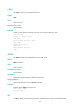
# Display the names of the files and sub-directories under the current working directory.
sftp> dir –a
config.cfg
pubkey2
pubkey1
pub1
new1
new2
pub2
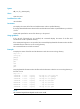
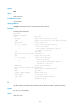
# Display detailed information about the files and sub-directories under the current working directory in
the form of a list.
sftp> dir –l
-rwxrwxrwx 1 noone nogroup 1759 Aug 23 06:52 config.cfg
-rwxrwxrwx 1 noone nogroup 225 Aug 24 08:01 pubkey2
-rwxrwxrwx 1 noone nogroup 283 Aug 24 07:39 pubkey1
-rwxrwxrwx 1 noone nogroup 225 Sep 28 08:28 pub1
drwxrwxrwx 1 noone nogroup 0 Sep 28 08:24 new1
drwxrwxrwx 1 noone nogroup 0 Sep 28 08:18 new2
-rwxrwxrwx 1 noone nogroup 225 Sep 28 08:30 pub2
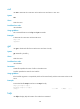
NOTE:
The command output format depends on the server model.