
R21xx-HP FlexFabric 11900 Security Command Reference


178
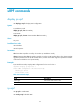
Syntax
ip urpf { loose | strict }
undo ip urpf
Default
uRPF is disabled.
Views
System view
Predefined user roles
network-admin
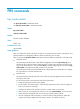
Parameters
loose: Enables loose uRPF check. To pass loose uRPF check, the source address of a packet must match
the destination address of a FIB entry.
strict: Enables strict uRPF check. To pass strict uRPF check, the source address and receiving interface of
a packet must match the destination address and output interface of a FIB entry.
Usage guidelines
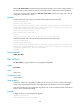
uRPF can be deployed on a PE connected to a CE or another ISP, or on a CE.
Configure strict uRPF check on a PE interface connected to a CE, and configure loose uRPF check on an
PE interface connected to another ISP.
For asymmetrical routing where the interface receiving upstream traffic is different from the interface
forwarding downstream traffic on a PE device, configure loose uRPF to avoid discarding valid packets.
If the two interfaces are the same (symmetrical routing), configure strict uRPF. An ISP usually adopts
symmetrical routing on a PE device.
Examples
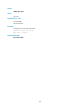
# Enable strict uRPF check globally.
<Sysname>system-view
[Sysname]ip urpf strict
Related commands
display ip urpf