
R21xx-HP FlexFabric 11900 Security Command Reference


180
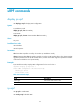
After the fips mode enable command is executed, the system prompts you to choose a startup method. If
you do not make a choice within 30 seconds, the system uses the manual reboot method by default.
To switch to non-FIPS mode, execute the undo fips mode enable command in system view, save the
configuration, and reboot the device.
Examples
# Enable FIPS mode, and choose the automatic reboot method to enter FIPS mode.
<Sysname> system-view
[Sysname] fips mode enable
Create a new start-up configuration file named fips-startup.cfg used for FIPS mode. After
setting the username and password for logging in the device of FIPS mode, the device will
be rebooted automatically. Are you sure? [Y/N]:y
Enter username(1~55 characters): root
Enter password(15~63 characters):
Confirm:
Waiting for reboot ...After reboot, the device will enter fips mode.
# Enable FIPS mode, and choose the manual reboot method to enter FIPS mode.
<Sysname> system-view
[Sysname] fips mode enable
Create a new start-up configuration file named fips-startup.cfg used for FIPS mode. After
setting the username and password for logging in the device of FIPS mode, the device will
be rebooted automatically. Are you sure? [Y/N]:n
[Sysname]
Related commands
display fips status
fips self-test
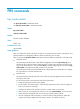
Use fips self-test to trigger a self-test on the cryptographic algorithms.
Syntax
fips self-test
Views
System view
Predefined user roles
network-admin
Usage guidelines
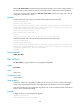
To examine whether the cryptography modules operate correctly, you can use a command to trigger a
self-test on the cryptographic algorithms. The triggered self-test is the same as the power-up self-test.
Only when the self-tests on all cryptographic algorithms pass, the whole self-test succeeds. If the self-test
fails, the device automatically reboots.
Examples
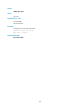
# Trigger a self-test on the cryptographic algorithms.
<Sysname> system-view
FIPS Known-Answer Tests are running ...