
R21xx-HP FlexFabric 11900 Security Command Reference


201
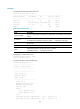
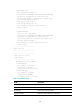
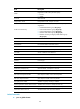
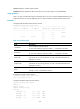
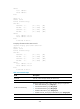
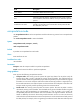
Field Description
local address Local end IP address of the IPsec tunnel.
remote address Remote end IP address of the IPsec tunnel.
Flow
Information about the data flow protected by the IPsec tunnel, including
source IP address, destination IP address, source port, destination port and
protocol.
as defined in ACL 3001
Range of data flow protected by the IPsec tunnel that is established
manually. This information shows that the IPsec tunnel protects all data
flows defined by ACL 3001.
encapsulation-mode
Use encapsulation-mode to set the encapsulation mode that the security protocol uses to encapsulate IP
packets.
Use undo encapsulation-mode to restore the default.
Syntax
encapsulation-mode { transport | tunnel }
undo encapsulation-mode
Default
IP packets are encapsulated in tunnel mode.
Views
IPsec transform set view
Predefined user roles
network-admin
Parameters
transport: Uses the transport mode for IP packet encapsulation.
tunnel: Uses the tunnel mode for IP packet encapsulation.
Usage guidelines
IPsec supports the following encapsulation modes:
• Transport mode—The security protocols protect the upper layer data of an IP packet. Only the
transport layer data is used to calculate the security protocol headers. The calculated security
protocol headers and the encrypted data (only for ESP encapsulation) are placed after the original
IP header. You can use the transport mode when end-to-end security protection is required, that is,
the secured transmission start and end points are the actual start and end points of the data. The
transport mode is typically used for protecting host-to-host communications.
• Tunnel mode—The security protocols protect the entire IP packet. The entire IP packet is used to
calculate the security protocol headers. The calculated security protocol headers and the encrypted
data (only for ESP encapsulation) are encapsulated in a new IP packet. In this mode, the
encapsulated packet has two IP headers. The inner IP header is the original IP header. The outer IP
header is added by the network device that provides the IPsec service. You must use the tunnel
mode when the secured transmission start and end points are not the actual start and end points of
the data packets, for example, when two gateways provide IPsec but the data start and end points