
R21xx-HP FlexFabric 11900 Security Command Reference
216
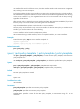
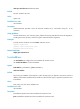
# Configure the global IPsec SA lifetime as 10240 kilobytes.
[Sysname] ipsec sa global-duration traffic-based 10240
Related commands
• display ipsec sa
• sa duration
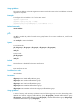
ipsec sa idle-time
Use ipsec sa idle-time to enable the global IPsec SA idle timeout function and set the idle timeout. If no
traffic matches an IPsec SA within the idle timeout interval, the IPsec SA is deleted.
Use undo ipsec sa idle-time to restore the default.
Syntax
ipsec sa idle-time seconds
undo ipsec sa idle-time
Default
The global IPsec SA idle timeout function is disabled.
Views
System view
Predefined user roles
network-admin
Parameters
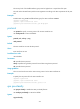
seconds: Specifies the IPsec SA idle timeout, in the range of 60 to 86400 seconds.
Usage guidelines
This function applies only to IPsec SAs negotiated by IKE.
The IPsec SA idle timeout can also be configured in IPsec policy view or IPsec policy template view, which
takes precedence over the global IPsec SA timeout.
Examples
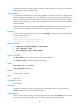
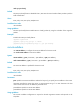
# Set the IPsec SA idle timeout to 600 seconds.
<Sysname> system-view
[Sysname] ipsec sa idle-time 600
Related commands
• display ipsec sa
• sa idle-time
ipsec transform-set
Use ipsec transform-set to create an IPsec transform set and enter IPsec transform set view.
Use undo ipsec transform-set to delete an IPsec transform set.
Syntax
ipsec transform-set transform-set-name