
R21xx-HP FlexFabric 11900 Security Command Reference
76
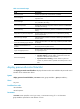
password: Specifies the password string. This argument is case sensitive. If simple is specified, it must be
a string of 1 to 128 characters. If cipher is specified, it must be a ciphertext string of 1 to 201 characters.
Usage guidelines
This command is effective only after the login-dn command is configured.
For security purpose, all passwords, including passwords configured in plain text, are saved in
ciphertext.
Examples
# Configure the administrator password to abcdefg in plain text.
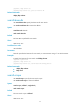
<Sysname> system-view
[Sysname] ldap server ccc
[Sysname-ldap-server-ccc] login-password simple abcdefg
Related commands
• display ldap scheme
• login-dn
protocol-version
Use protocol-version to specify the LDAP version.
Use undo protocol-version to restore the default.
Syntax
protocol-version { v2 | v3 }
undo protocol-version
Default
The LDAP version is LDAPv3.
Views
LDAP server view
Predefined user roles
network-admin
Parameters
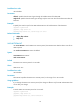
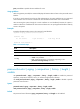
v2: Specifies the LDAP version LDAPv2.
v3: Specifies the LDAP version LDAPv3.
Usage guidelines
For successful LDAP authentication, the LDAP version used by the device must be consistent with the
version used by the LDAP server.
If you change the LDAP version, the change is effective only for LDAP authentication that occurs after your
change.
A Microsoft LDAP server supports only LDAPv3.
Examples
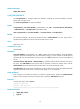
# Specify the LDAP version as LDAPv2.
<Sysname> system-view