
R21xx-HP FlexFabric 11900 Security Configuration Guide

94
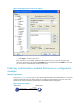
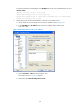
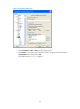
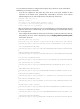
Figure 25 Specifying the host name (or IP address)
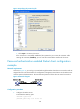
c. Click Open to connect to the server.
If the connection is successfully established, the system asks you to enter the username and
password. After entering the username (client001 in this case) and password (aabbcc in this case),
you can enter the command-line interface of the server.
Publickey authentication enabled Stelnet server configuration
example
Network requirements
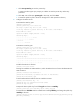
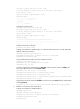
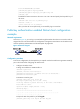
As shown in Figure 26, you can log in to the switch through the Stelnet client (SSH2) that runs on the host
and are assigned the user role network-admin for configuration management. The switch acts as the
Stelnet server and uses publickey authentication and the RSA public key algorithm.
Figure 26 Network diagram
Vlan-int2
192.168.1.40/24
Stelnet client Stelnet server
Host
192.168.1.56/24
Switch