
R21xx-HP FlexFabric 11900 Security Configuration Guide
97
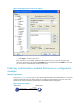
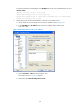
c.
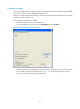
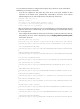
Click Save private key to save the private key.
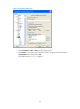
A warning window pops up to prompt you whether to save the private key without any
protection.
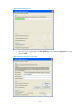
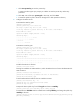
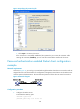
d. Click Yes, enter a file name (private.ppk in this case), and click Save.
e. Transmit the public key file to the server through FTP or TFTP. (Details not shown.)
2. Configure the Stelnet server:
# Generate the RSA key pairs.
<Switch> system-view
[Switch] public-key local create rsa
The range of public key size is (512 ~ 2048).
If the key modulus is greater than 512, it will take a few minutes.
Press CTRL+C to abort.
Input the modulus length [default = 1024]:
Generating Keys...
........................++++++
...................++++++
..++++++++
............++++++++
# Generate a DSA key pair.
[Switch] public-key local create dsa
The range of public key size is (512 ~ 2048).
If the key modulus is greater than 512, it will take a few minutes.
Press CTRL+C to abort.
Input the modulus length [default = 1024]:
Generating Keys...
.++++++++++++++++++++++++++++++++++++++++++++++++++*
........+......+.....+......................................+
...+.................+..........+...+
# Enable the SSH server function.
[Switch] ssh server enable
# Assign an IP address to VLAN-interface 2, which the Stelnet client will use as the destination for
SSH connection.
[Switch] interface vlan-interface 2
[Switch-Vlan-interface2] ip address 192.168.1.40 255.255.255.0
[Switch-Vlan-interface2] quit
# Set the authentication mode for the user interfaces to AAA.
[Switch] user-interface vty 0 15
[Switch-ui-vty0-15] authentication-mode scheme
[Switch-ui-vty0-15] quit
# Import the client's public key from file key.pub and name it switchkey.
[Switch] public-key peer switchkey import sshkey key.pub
# Creat SSH user client002 with the authentication method publickey, and assign the public key
switchkey to the user.
[Switch] ssh user client002 service-type stelnet authentication-type publickey assign
publickey switchkey