
R21xx-HP FlexFabric 11900 Security Configuration Guide



106
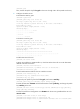
If the key modulus is greater than 512, it will take a few minutes.
Press CTRL+C to abort.
Input the modulus length [default = 1024]:
Generating Keys...
.++++++++++++++++++++++++++++++++++++++++++++++++++*
........+......+.....+......................................+
...+.................+..........+...+
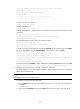
# Enable the SSH server function.
[Switch] ssh server enable
# Enable the SFTP server.
[Switch] sftp server enable
# Assign an IP address to VLAN-interface 2, which the client will use as the destination for SSH
connection.
[Switch] interface vlan-interface 2
[Switch-Vlan-interface2] ip address 192.168.1.45 255.255.255.0
[Switch-Vlan-interface2] quit
# Set the authentication mode of the user interfaces to AAA.
[Switch] user-interface vty 0 15
[Switch-ui-vty0-15] authentication-mode scheme
[Switch-ui-vty0-15] quit
# Create a local device management user named client002 with the plaintext password aabbcc,
the service type ssh, the user role network-admin, and the working directory flash:/.
[Switch] local-user client002 class manage
[Switch-luser-manage-client002] password simple aabbcc
[Switch-luser-manage-client002] service-type ssh
[Switch-luser-manage-client002] authorization-attribute user-role network-admin
work-directory flash:/
[Switch-luser-manage-client002] quit
# Create the SSH user client002 with the authentication method password and service type sftp.
[Switch] ssh user client002 service-type sftp authentication-type password
2. Establish a connection between the SFTP client and the SFTP server:
The device supports a variety of SFTP client software. This example uses an SFTP client that runs
PSFTP of PuTTy Version 0.58.
NOTE:
PSFTP supports only password authentication.
To establish a connection to the SFTP server:
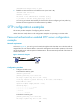
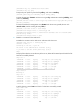
a. Run the psftp.exe to launch the client interface shown in Figure 36, and enter the following
command:
open 192.168.1.45
b. Enter username client002 and password aabbcc as prompted to log in to the SFTP server.