
R21xx-HP FlexFabric 11900 Security Configuration Guide

115
Tasks at a
g
lance
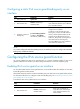
(Optional.) Configuring a static IPv6 source guard binding entry on an interface
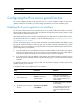
Configuring the IPv4 source guard function
You cannot configure the IPv4 source guard function on a service loopback interface. If IPv4 source
guard is enabled on an interface, you cannot assign the interface to a service loopback group.
Enabling IPv4 source guard on an interface
You must first enable the IPv4 source guard function on an interface before the interface can obtain
dynamic IPv4 binding entries and use static and dynamic IPv4 binding entries to filter packets or help
other modules to provide security services.
All the fields except the VLAN in a static IPv4 binding entry are used by IP source guard to filter packets.
For information about how to configure a static IPv4 binding entry, see "
Configuring a static IPv4 source
guard binding entry on an interface."
Dynamic IPv4 binding entries can contain such information as the MAC address, IPv4 address, VLAN
tag, ingress interface information, and entry type (such as DHCP snooping and DHCP relay). Which
information in an entry is used by IP source guard to filter IPv4 packets is determined by the IPv4 source
guard configuration on the interface:
• If you bind both the source IP address and the source MAC address on the interface, the interface
forwards a received packet only when the packet's source IP address and source MAC address
both match a dynamic binding entry. If no match is found, the packet is dropped.
• If you bind only the source IP address on the interface, the interface forwards a packet as long as
the packet's source IP address matches a dynamic binding entry. If no match is found, the packet is
dropped.
To implement dynamic IPv4 source guard, make sure the DHCP snooping or DHCP relay function
operates properly on the network.
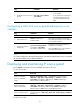
To enable the IPv4 source guard function on an interface:
Ste
p
Command
Remarks
1. Enter system view.
system-view N/A
2. Enter interface view.
interface interface-type
interface-number
These types of interfaces are
supported: Layer 2 Ethernet port,
Layer 3 Ethernet interface, and
VLAN interface.
3. Enable the IPv4 source guard
function.
ip verify source ip-address
[ mac-address ]
By default, the function is disabled
on an interface.
If you configure this command on
an interface multiple times, the
most recent configuration takes
effect.