
R21xx-HP FlexFabric 11900 Security Configuration Guide

121
The output shows that IP source guard has generated a dynamic IPv4 binding entry on port
Ten-GigabitEthernet 1/0/1 based on the DHCP snooping entry.
Dynamic IPv4 source guard using DHCP relay
configuration example
Network requirements
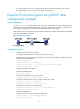
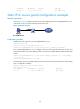
As shown in Figure 42, the host and the DHCP server are connected to the switch through interfaces
VLAN-interface 100 and VLAN-interface 200, respectively. DHCP relay is enabled on the switch. The
host obtains an IP address from the DHCP server through the DHCP relay agent.
Enable dynamic IPv4 source guard on VLAN-interface 100 to filter received packets based on the DHCP
relay entry generated on the switch.
Figure 42 Network diagram
Configuration procedure
1. Configure dynamic IPv4 source guard:
# Configure IP addresses for the interfaces. (Details not shown.)
# Enable IPv4 source guard on VLAN-interface 100 to filter packets based on both the source IP
address and the MAC address.
<Switch> system-view
[Switch] interface vlan-interface 100
[Switch-Vlan-interface100] ip verify source ip-address mac-address
[Switch-Vlan-interface100] quit
2. Configure the DHCP relay agent:
# Enable the DHCP service.
[Switch] dhcp enable
# Enable recording DHCP relay client entries.
[Switch] dhcp relay client-information record
# Configure VLAN-interface 100 to operate in DHCP relay mode.
[Switch] interface vlan-interface 100
[Switch-Vlan-interface100] dhcp select relay
# Specify the IP address of the DHCP server.
[Switch-Vlan-interface100] dhcp relay server-address 10.1.1.1
[Switch-Vlan-interface100] quit
3. Verify the configuration:
# Display dynamic IPv4 source guard binding entries.
[Switch] display ip source binding dhcp-relay
Total entries found: 1