
R21xx-HP FlexFabric 11900 Security Configuration Guide

124
• ARP source suppression—If the attack packets have the same source address, you can enable the
ARP source suppression function, and set the maximum number of unresolvable IP packets that the
device can receive from a host within 5 seconds. If the threshold is reached, the device stops
resolving packets from the host until the 5 seconds elapse.
• ARP black hole routing—You can enable the ARP black hole routing function regardless of whether
the attack packets have the same source address. After receiving an unresolvable IP packet, the
device creates a black hole route destined for that IP address and drops all the matching packets
until the black hole route ages out.
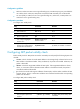
Configuring ARP source suppression
Ste
p
Command
Remarks
1. Enter system view.
system-view N/A
2. Enable ARP source suppression.
arp source-suppression
enable
By default, ARP source suppression is
disabled.
3. Set the maximum number of
unresolvable packets that the
device can receive from a host
within 5 seconds.
arp source-suppression
limit limit-value
By default, the maximum number is 10.
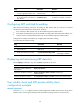
Enabling ARP black hole routing
Ste
p
Command
Remarks
1. Enter system view.
system-view N/A
2. Enable ARP black hole routing.
arp resolving-route enable
By default, ARP black hole routing
is enabled.
Displaying and maintaining unresolvable IP attack protection
Execute display commands in any view.
Task Command
Display ARP source suppression configuration information.
display arp source-suppression
Configuration example
Network requirements
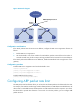
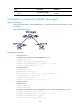
As shown in Figure 44, a LAN contains two areas: an R&D area in VLAN 10 and an office area in VLAN
20. Each area connects to the gateway (Device) through an access switch.
A large number of ARP requests are detected in the office area and are considered as the consequence
of an unresolvable IP attack. To prevent such attacks, configure ARP source suppression and ARP black
hole routing.