
R21xx-HP FlexFabric 11900 Security Configuration Guide

136
Ste
p
Command
5. Enable fixed ARP.
arp fixup
Configuring ARP gateway protection
Configure this feature on interfaces not connected with a gateway to prevent gateway spoofing attacks.
When such an interface receives an ARP packet, it checks whether the sender IP address in the packet is
consistent with that of any protected gateway. If yes, it discards the packet. If not, it handles the packet.
Configuration guidelines
Follow these guidelines when you configure ARP gateway protection:
• You can enable ARP gateway protection for a maximum of eight gateways on an interface.
• Do not configure both the arp filter source and arp filter binding commands on an interface.
• If ARP gateway protection works with ARP detection, ARP snooping, ARP gateway protection
applies first.
Configuration procedure
To configure ARP gateway protection:
Ste
p
Command
Remarks
1. Enter system view.
system-view N/A
2. Enter Layer-2 Ethernet interface
and Layer-2 aggregate interface
view.
interface interface-type
interface-number
Support for the views
depends on the device
model.
3. Enable ARP gateway protection
for a specified gateway.
arp filter source ip-address
By default, ARP gateway
protection is disabled.
Configuration example
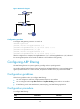
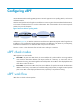
Network requirements
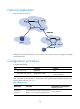
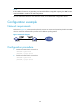
As shown in Figure 48, Host B launches gateway spoofing attacks to Switch B. As a result, traffic that
Switch B intends to send to Switch A is sent to Host B.
Configure Switch B to block such attacks.