
R21xx-HP FlexFabric 11900 Security Configuration Guide

137
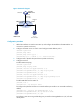
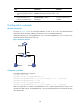
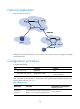
Figure 48 Network diagram
Configuration procedure
# Configure ARP gateway protection on Switch B.
<SwitchB> system-view
[SwitchB] interface ten-gigabitethernet 1/0/1
[SwitchB-Ten-GigabitEthernet1/0/1] arp filter source 10.1.1.1
[SwitchB-Ten-GigabitEthernet1/0/1] quit
[SwitchB] interface ten-gigabitethernet 1/0/2
[SwitchB-Ten-GigabitEthernet1/0/2] arp filter source 10.1.1.1
After the configuration is complete, Ten-GigabitEthernet 1/0/1 and Ten-GigabitEthernet 1/0/2 discard
the incoming ARP packets whose sender IP address is the IP address of the gateway.
Configuring ARP filtering
The ARP filtering feature can prevent gateway spoofing and user spoofing attacks.
An interface enabled with this feature checks the sender IP and MAC addresses in a received ARP packet
against permitted entries. If a match is found, the packet is handled. If not, the packet is discarded.
Configuration guidelines
Follow these guidelines when you configure ARP filtering:
• You can configure a maximum of eight permitted entries on an interface.
• Do not configure both the arp filter source and arp filter binding commands on an interface.
• If ARP filtering works with ARP detection, ARP snooping, and ARP filtering applies first.
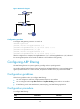
Configuration procedure
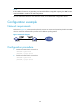
To configure ARP filtering:
Ste
p
Command
Remarks
1. Enter system view.
system-view N/A