
R21xx-HP FlexFabric 11900 Security Configuration Guide
148
FIPS configuration examples
FIPS configuration example (automatic reboot)
Network requirements
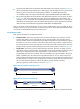
Use the automatic reboot method to enter FIPS mode, and log in to the device through a Console port.
Configuration procedure
# Enable FIPS mode, choose the automatic reboot method to enter FIPS mode, and set the username to
root and password to 12345zxcvb!@#$%ZXCVB. If you want to save the current configuration, execute
the save command before you enable FIPS mode.
<Sysname> system-view
[Sysname] fips mode enable
Create a new start-up configuration file named fips-strartup.cfg used for FIPS mode. After
setting the login username and password for FIPS mode, the device will be rebooted
automatically. Are you sure? [Y/N]:y
Enter username(1~55 characters): root
Enter password(15~63 characters):
Confirm:
Waiting for reboot ...After reboot, the device will enter FIPS mode.
Verifying the configuration
After the device reboots, enter the username and password. The system prompts you to reset the
password for your first login. After the password is reset, the device enters FIPS mode.
Press ENTER to get started.
login: root
Password:
First login or password reset. For security reason, you need to change your pass
word. Please enter your password.
old password:
new password:
confirm:
Updating user information. Please wait ... ...
…
# Display the current FIPS mode state.
<Sysname> display fips status
FIPS mode is enabled.
# Display the default configuration file.
<Sysname> more fips-startup.cfg
#
password-control enable
#
local-user root class manage
service-type terminal
authorization-attribute user-role network-admin
#
fips mode enable