
R21xx-HP FlexFabric 11900 Security Configuration Guide

166
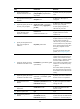
Ste
p
Command
Remarks
1. Enter system view.
system-view N/A
2. Enable ACL checking for
de-encapsulated packets.
ipsec decrypt-check enable By default, this feature is enabled.
Configuring the IPsec anti-replay function
The IPsec anti-replay function protects networks against anti-replay attacks by using a sliding window
mechanism called anti-replay window. This function checks the sequence number of each received IPsec
packet against the current IPsec packet sequence number range of the sliding window. If the sequence
number is not in the current sequence number range, the packet is considered a replayed packet and is
discarded.
IPsec packet de-encapsulation involves complicated calculation. De-encapsulation of replayed packets
not only makes no sense, but also consumes large amounts of resources and degrades performance,
resulting in DoS. IPsec anti-replay can check and discard replayed packets before de-encapsulation.
In some cases, however, the sequence numbers of some normal service data packets may be out of the
current sequence number range, and the IPsec anti-replay function may drop them as well, affecting the
normal communications. If this happens, disable IPsec anti-replay or adjust the size of the anti-replay
window.
IPsec anti-replay does not affect manually created IPsec SAs. According to the IPsec protocol, only IPsec
SAs negotiated by IKE support anti-replay checking.
IMPORTANT:
• IPsec anti-replay is enabled by default. Do not disable it in normal cases.
• A wider anti-replay window results in higher overheads and more performance de
g
radation, which is
against the original intention of the IPsec anti-replay function. Therefore, specify an anti-replay windo
w
size that is as small as possible.
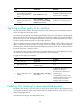
To configure IPsec anti-replay:
Ste
p
Command
Remarks
1. Enter system view.
system-view N/A
2. Enable IPsec anti-replay.
ipsec anti-replay check
By default, IPsec anti-replay is
enabled.
3. Set the size of the IPsec
anti-replay window.
ipsec anti-replay window width The default size is 64.
Binding a source interface to an IPsec policy
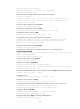
For high availability, a core device is usually connected to an ISP through two links, which operate in
backup or load sharing mode. The two interfaces negotiate with their peers to establish IPsec SAs
respectively. When one interface fails and a link failover occurs, the other interface needs to take some
time to re-negotiate SAs, resulting in service interruption.
To solve the problems, bind a source interface to an IPsec policy and apply the policy to both interfaces.
This enables the two physical interfaces to use the same source interface to negotiate IPsec SAs. As long