
R21xx-HP FlexFabric 11900 Security Configuration Guide

169
Ste
p
Command
Remarks
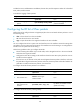
2. Configure the DF bit of
IPsec packets globally.
ipsec global-df-bit { clear | copy | set }
By default, IPsec copies the DF bit
in the original IP header to the
new IP header.
Displaying and maintaining IPsec
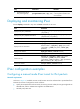
Execute display commands in any view and reset commands in user view.
Task Command
Display IPsec policy information.
display ipsec { ipv6-policy | policy } [ policy-name
[ seq-number ] ]
Display IPsec policy template information.
display ipsec { ipv6-policy-template | policy-template }
[ template-name [ seq-number ] ]
Display IPsec profile information. display ipsec profile [ profile-name ]
Display IPsec transform set information. display ipsec transform-set [ transform-set-name ]
Display IPsec SA information.
display ipsec sa [ brief | count | interface interface-type
interface-number | { ipv6-policy | policy } policy-name
[ seq-number ] | profile policy-name | remote [ ipv6 ]
ip-address ]
Display IPsec statistics. display ipsec statistics [ tunnel-id tunnel-id ]
Display IPsec tunnel information. display ipsec tunnel { brief | count | tunnel-id tunnel-id }
Clear IPsec SAs.
reset ipsec sa [ { ipv6-policy | policy } policy-name
[ seq-number ] | profile policy-name | remote
{ ipv4-address | ipv6 ipv6-address } | spi { ipv4-address |
ipv6 ipv6-address } { ah | esp } spi-num ]
Clear IPsec statistics. reset ipsec statistics [ tunnel-id tunnel-id ]
IPsec configuration examples
Configuring a manual mode IPsec tunnel for IPv4 packets
Network requirements
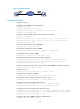
As shown in Figure 57, establish an IPsec tunnel between Switch A and Switch B to protect data flows
between the switches. Configure the tunnel as follows:
• Specify the encapsulation mode as tunnel, the security protocol as ESP, the encryption algorithm as
AES-CBC-192, and the authentication algorithm as HMAC-SHA1.
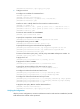
• Manually setup IPsec SAs.