
R21xx-HP FlexFabric 11900 Security Configuration Guide


184
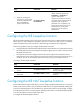
Ste
p
Command
Remarks
3. (Optional.) Configure the
local device to always obtain
the identity information from
the local certificate for
signature authentication.
ike signature-identity
from-certificate
By default, the local end uses the
identity information specified by
local-identity or ike identity for
signature authentication.
Configure the command on the local
device that initiates aggressive IKE SA
negotiations that use signature
authentication for compatibility with
the peer device running a Comware
V5-based release. Such release
supports only DN for signature
authentication.
Configuring the IKE keepalive function
IKE sends keepalive packets to query the liveness of the peer. If the peer is configured with the keepalive
timeout time, you must configure the keepalive interval at the local. If the peer receives no keepalive
packets during the timeout time, the IKE SA is deleted along with the IPsec SAs it negotiated.
Follow these guidelines when you configure the IKE keepalive function:
• Configure IKE DPD instead of the IKE keepalive function unless IKE DPD is not supported on the peer.
The IKE keepalive function sends keepalive messages at regular intervals, which consumes network
bandwidth and resources.
• The keepalive timeout time configured at the local must be longer than the keepalive interval
configured at the peer. Since it seldom occurs that more than three consecutive packets are lost on
a network, you can set the keepalive timeout three times as long as the keepalive interval.
To configure the IKE keepalive function:
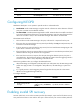
Ste
p
Command
Remarks
1. Enter system view.
system-view N/A
2. Set the IKE SA keepalive
interval.
ike keepalive interval seconds
By default, no keepalive messages
are sent to the peer.
3. Set the IKE SA keepalive
timeout time.
ike keepalive timeout seconds
By default, IKE SA keepalive never
times out.
Configuring the IKE NAT keepalive function
If IPsec traffic passes through a NAT device, you must configure the NAT traversal function. If no packet
travels across an IPsec tunnel in a period of time, the NAT sessions are aged and deleted, disabling the
tunnel from transmitting data to the intended end. To prevent NAT sessions from being aged, configure
the NAT keepalive function on the IKE gateway behind the NAT device to send NAT keepalive packets
to its peer periodically to keep the NAT session alive.
To configure the IKE NAT keepalive function: