
R21xx-HP FlexFabric 11900 Security Configuration Guide

19
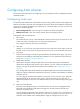
information about password management and global password configuration, see "Configuring
password control."
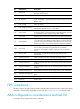
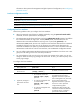
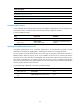
Local user configuration task list
Tasks at a
g
lance
(Required.) Configuring local user attributes
(Optional.) Configuring user group attributes
(Optional.) Displaying and maintaining local users and local user groups
Configuring local user attributes
Follow these guidelines when you configure local user attributes:
• When the password control feature is globally enabled by using the password-control enable
command, local user passwords are not displayed.
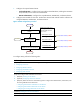
• The authentication mode of user interfaces is set by the authentication-mode command, and affects
the commands available for login users. In AAA (scheme) mode, the authorized user role
determines the commands available for each login user. In password (password) or no
authentication (none) mode, the user role of respective user interfaces determines the commands
available for the login users. The user role of respective user interfaces also determines the
commands available for the public key authenticated SSH users. For more information about the
authentication mode and user roles for user interfaces, see Fundamentals Configuration Guide.
• You can configure authorization attributes and password control attributes in local user view or user
group view. The setting in local user view takes precedence.
• You cannot delete a local user who is the only security log manager in the system, nor can you
change or delete the security log manager role of the user. To do so, you must first specify a new
security log manager.
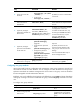
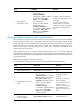
To configure local user attributes:
Ste
p
Command
Remarks
1. Enter system view.
system-view N/A
2. Add a local user and enter
local user view.
local-user user-name [ class
{ manage | network } ]
By default, no local user exists.
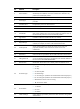
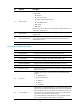
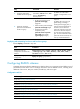
3. (Optional.) Configure a
password for the local
user.
• For a network access user:
password { cipher | simple }
password
• For a device management user
in non-FIPS mode:
password [ { hash | simple }
password ]
• For a device management user
in FIPS mode:
password
Network access user passwords are
encrypted with the encryption
algorithm and saved in cipher text.
Device management user passwords
are encrypted with the hash
algorithm and saved in cipher text.
A local user with no password
configured directly passes
authentication after providing the
valid local username and attributes.
To enhance security, configure a
password for each local user.