
R21xx-HP FlexFabric 11900 Security Configuration Guide

25
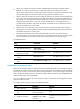
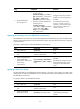
Ste
p
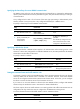
Command
Remarks
2. Enter RADIUS scheme view.
radius scheme
radius-scheme-name
N/A
3. Set the format for usernames
sent to the RADIUS servers.
user-name-format { keep-original
| with-domain | without-domain }
Optional.
By default, the ISP domain name is
included in a username.
4. Set the data flow and packet
measurement units for traffic
statistics.
data-flow-format { data { byte |
giga-byte | kilo-byte |
mega-byte } | packet
{ giga-packet | kilo-packet |
mega-packet | one-packet } }*
Optional.
By default, traffic is counted in
bytes and packets.
Setting the maximum number of RADIUS request transmission attempts
RADIUS uses UDP packets to transfer data. UDP communication is not reliable. To improve reliability,
RADIUS uses a retransmission mechanism. If a NAS sends a RADIUS request to a RADIUS server but
receives no response before the response timeout timer (defined by the timer response-timeout command)
expires, it retransmits the request. If the number of transmission attempts exceeds the specified limit but
it still receives no response, it tries to communicate with other RADIUS servers in active state. If no other
servers are in active state at the time, it considers the authentication or accounting attempt a failure. For
more information about the RADIUS server response timeout timer, see "Setting RADIUS timers."
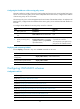
T
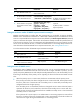
o set the maximum number of RADIUS request transmission attempts:
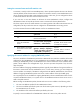
Ste
p
Command
Remarks
1. Enter system view.
system-view N/A
2. Enter RADIUS scheme view.
radius scheme
radius-scheme-name
N/A
3. Set the maximum number of RADIUS
request transmission attempts.
retry retry-times The default setting is 3.
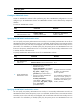
Setting the status of RADIUS servers
By setting the status of RADIUS servers to blocked or active, you can control the RADIUS servers with
which the device communicates when the current servers are no longer available. In practice, you can
specify one primary RADIUS server and multiple secondary RADIUS servers, with the secondary servers
functioning as the backup of the primary servers. Typically, the device chooses servers based on these
rules:
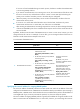
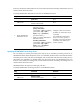
• When the primary server is in active state, the device communicates with the primary server.
If the primary server fails, the device changes the server's status to blocked, starts a quiet timer for
the server, and tries to communicate with a secondary server in active state (a secondary server
configured earlier has a higher priority).
If the secondary server is unreachable, the device changes the server's status to blocked, starts a
quiet timer for the server, and continues to check the next secondary server in active state. This
search process continues until the device finds an available secondary server or has checked all
secondary servers in active state.
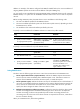
If the quiet timer of a server expires or an authentication or accounting response is received from
the server, the status of the server changes back to active automatically, but the device does not
check the server again during the authentication or accounting process.