
R21xx-HP FlexFabric 11900 Security Configuration Guide

28
• When you configure the maximum number of RADIUS packet transmission attempts and the
RADIUS server response timeout timer, consider the number of secondary servers. If the
retransmission process takes too much time, the client connection in the access module such as the
Telnet module might time out while the device is trying to find an available server.
• When a number of secondary servers are configured, the client connections of access modules that
have a short client connection timeout period might still be timed out during initial authentication or
accounting, even if the packet transmission attempt limit and server response timeout period are
configured with small values. In this case, the next authentication or accounting attempt can
succeed because the device has set the status of the unreachable servers to blocked so time for
finding a reachable server is shortened.
• Make sure the server quiet timer is set correctly. Too short a quiet timer might result in frequent
authentication or accounting failures because the device keeps attempting to communicate with an
unreachable server that is in active state.
• Consider the performance of the NAS and the RADIUS server when you set the real-time
accounting interval. A short interval helps improve accounting precision but requires many system
resources. When there are 1000 or more users, set the interval to 15 minutes or longer.
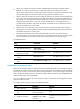
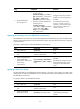
To set RADIUS timers:
Ste
p
Command
Remarks
1. Enter system view.
system-view N/A
2. Enter RADIUS scheme view.
radius scheme
radius-scheme-name
N/A
3. Set the RADIUS server
response timeout timer.
timer response-timeout seconds The default setting is 3 seconds.
4. Set the quiet timer for the
servers.
timer quiet minutes The default setting is 5 minutes.
5. Set the real-time accounting
timer.
timer realtime-accounting minutes The default setting is 12 minutes.
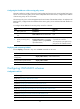
Configuring the accounting-on feature
When the accounting-on feature is enabled, the device automatically sends an accounting-on packet to
the RADIUS server after the reboot of the device. When receiving the accounting-on packet, the RADIUS
server logs out all users who access the network through the device, so they could re-log in through the
device. Without this feature, these users cannot log in again after the reboot, because the RADIUS server
would consider them to be online already.
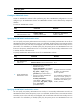
You can configure the interval for which the device waits to resend the accounting-packet and the
maximum number of retries.
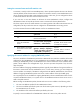
To configure the accounting-on feature for a RADIUS scheme:
Ste
p
Command
Remarks
1. Enter system view.
system-view N/A
2. Enter RADIUS scheme
view.
radius scheme
radius-scheme-name
N/A
3. Enable accounting-on.
accounting-on enable
[ interval seconds | send
send-times ] *
By default, the accounting-on feature is
disabled.