
R21xx-HP FlexFabric 11900 Security Configuration Guide

29
Configuring the IP addresses of the security policy servers
The NAS verifies the validity of received control packets and accepts only control packets from known
servers. To use a security policy server that is independent of the AAA servers, configure the IP address
of the security policy server on the NAS.
The security policy server is the management and control center of the HP EAD solution. To implement all
EAD functions, configure both the IP address of the security policy server and that of the IMC Platform on
the NAS.
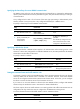
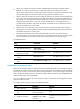
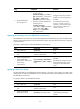
To configure the IP address of a security policy server for a scheme:
Ste
p
Command
Remarks
1. Enter system view.
system-view N/A
2. Enter RADIUS scheme
view.
radius scheme radius-scheme-name N/A
3. Specify a security policy
server.
security-policy-server { ipv4-address
| ipv6 ipv6-address } [ vpn-instance
vpn-instance-name ]
By default, no security policy server
is specified for a scheme.
You can specify up to eight security
policy servers for a RADIUS scheme.
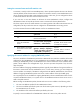
Displaying and maintaining RADIUS
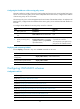
Execute display commands in any view and reset commands in user view.
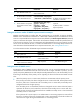
Task Command
Display the RADIUS scheme
configuration.
display radius scheme [ radius-scheme-name ]
Display RADIUS packet statistics. display radius statistics
Clear RADIUS statistics. reset radius statistics
Configuring HWTACACS schemes
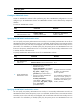
Configuration task list
Tasks at a
g
lance
(Required.) Creating an HWTACACS scheme
(Required.) Specifying the HWTACACS authentication servers
(Optional.) Specifying the HWTACACS authorization servers
(Optional.) Specifying the HWTACACS accounting servers
(Required.) Specifying the shared keys for secure HWTACACS communication
(Optional.) Specifying a VPN for the scheme
(Optional.) Setting the username format and traffic statistics units
(Optional.) Specifying the source IP address for outgoing HWTACACS packets
(Optional.) Setting HWTACACS timers