
R21xx-HP FlexFabric 11900 Security Configuration Guide

32
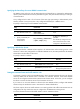
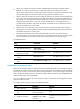
Ste
p
Command
Remarks
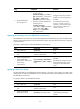
3. Specify HWTACACS
accounting servers.
• Specify the primary HWTACACS
accounting server:
primary accounting { ipv4-address |
ipv6 ipv6-address } [ port-number |
key { cipher | simple } string |
vpn-instance vpn-instance-name ] *
• Specify a secondary HWTACACS
accounting server:
secondary accounting
{ ipv4-address | ipv6 ipv6-address }
[ port-number | key { cipher |
simple } string | vpn-instance
vpn-instance-name ] *
Configure at least one command.
By default, no accounting server is
specified.
Two HWTACACS accounting
servers in a scheme, primary or
secondary, cannot have the same
combination of IP address, port
number, and VPN.
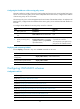
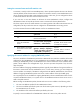
Specifying the shared keys for secure HWTACACS communication
The HWTACACS client and server use the MD5 algorithm and shared keys to generate the Authenticator
value for packet authentication and user password encryption. They must use the same key for each type
of communication
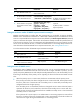
To specify a shared key for secure HWTACACS communication:
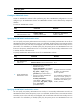
Ste
p
Command
Remarks
1. Enter system view.
system-view N/A
2. Enter HWTACACS scheme
view.
hwtacacs scheme
hwtacacs-scheme-name
N/A
3. Specify a shared key for
secure HWTACACS
authentication, authorization,
or accounting
communication.
key { accounting | authentication |
authorization } { cipher | simple }
string
By default, no shared key is
specified.
The shared key configured on the
device must be the same as that
configured on the HWTACACS
server.
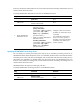
Specifying a VPN for the scheme
The VPN specified for an HWTACACS scheme applies to all servers in that scheme. If a VPN is also
configured for an individual HWTACACS server, the VPN specified for the HWTACACS scheme does
not take effect on that server.
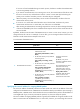
To specify a VPN for an HWTACACS scheme:
Ste
p
Command
Remarks
1. Enter system view.
system-view N/A
2. Enter HWTACACS scheme
view.
hwtacacs scheme
hwtacacs-scheme-name
N/A
3. Specify a VPN for the
HWTACACS scheme.
vpn-instance vpn-instance-name
By default, an HWTACACS
scheme belongs to the public
network.