
R21xx-HP FlexFabric 11900 Security Configuration Guide

33
Setting the username format and traffic statistics units
A username is usually in the format userid@isp-name, where isp-name represents the user's ISP domain
name. By default, the ISP domain name is included in a username. However, some HWTACACS servers
do not recognize usernames that contain ISP domain names. In this case, you can configure the device
to remove the domain name from each username to be sent.
If you want two or more ISP domains to reference the same HWTACACS scheme, configure that
HWTACACS scheme to keep the ISP domain name in usernames for domain identification.
The device reports online user traffic statistics in accounting packets. The traffic measurement units are
configurable, but they must be the same as configured on the HWTACACS accounting servers.
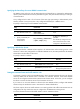
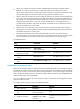
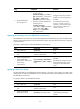
To set the username format and traffic statistics units for an HWTACACS scheme:
Ste
p
Command
Remarks
1. Enter system view.
system-view N/A
2. Enter HWTACACS scheme
view.
hwtacacs scheme
hwtacacs-scheme-name
N/A
3. Set the format of usernames
sent to the HWTACACS
servers.
user-name-format { keep-original |
with-domain | without-domain }
Optional.
By default, the ISP domain name
is included in a username.
4. Set the data flow and packet
measurement units for traffic
statistics.
data-flow-format { data { byte |
giga-byte | kilo-byte | mega-byte }
| packet { giga-packet | kilo-packet
| mega-packet | one-packet } }*
Optional.
By default, traffic is counted in
bytes and packets.
Specifying the source IP address for outgoing HWTACACS packets
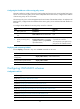
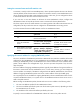
The source IP address of HWTACACS packets that a NAS sends must match the IP address of the NAS
configured on the HWTACACS server. An HWTACACS server identifies a NAS by IP address. Upon
receiving an HWTACACS packet, an HWTACACS server checks whether the source IP address of the
packet is the IP address of a managed NAS. If yes, the server processes the packet. If not, the server
drops the packet.
The source address of outgoing HWTACACS packets is typically the IP address of an egress interface on
the NAS to communicate with the HWTACACS server. In some cases, however, you must change the
source IP address. For example, if the NAS is configured with the VRRP for stateful failover, the source IP
address of outgoing HWTACACS packets can be the virtual IP address of the uplink VRRP group.
You can specify the source IP address for outgoing HWTACACS packets in HWTACACS scheme view for
a specific HWTACACS scheme, or in system view for all HWTACACS schemes whose servers are in a
VPN or the public network.
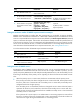
Before sending an HWTACACS packet, the NAS selects a source IP address in the following order:
1. The source IP address specified for the HWTACACS scheme.
2. The source IP address specified in system view for the VPN or public network, depending on where
the HWTACACS server resides.
3. The IP address of the outbound interface specified by the route.
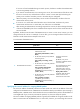
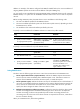
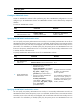
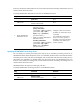
To specify a source IP address for all HWTACACS schemes of a VPN or the public network: