
R21xx-HP FlexFabric 11900 Security Configuration Guide

34
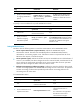
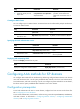
Ste
p
Command
Remarks
1. Enter system view.
system-view N/A
2. Specify a source IP address
for outgoing HWTACACS
packets.
hwtacacs nas-ip { ipv4-address |
ipv6 ipv6-address } [ vpn-instance
vpn-instance-name ]
By default, the IP address of the
HWTACACS packet outbound
interface is used as the source IP
address.
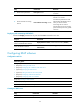
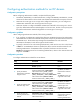
To specify a source IP address for a specific HWTACACS scheme:
Ste
p
Command
Remarks
1. Enter system view.
system-view N/A
2. Enter HWTACACS
scheme view.
hwtacacs scheme
hwtacacs-scheme-name
N/A
3. Specify a source IP
address for outgoing
HWTACACS packets.
nas-ip { ipv4-address | ipv6
ipv6-address }
By default, the source IP address specified
by the hwtacacs nas-ip command in system
view is used. If the source IP address is not
specified, the IP address of the egress
interface is used.
Setting HWTACACS timers
The device uses the following timers to control the communication with an HWTACACS server:
• Server response timeout timer (response-timeout)—Defines the HWTACACS request
retransmission interval. The timer starts immediately after an HWTACACS authentication,
authorization, or accounting request is sent. If the device receives no response from the server
before the timer expires, it resends the request.
• Server quiet timer (quiet)—Defines the duration to keep an unreachable server in blocked state. If
a server is not reachable, the device changes the server's status to blocked, starts this timer for the
server, and tries to communicate with another server in active state. After the server quiet timer
expires, the device changes the status of the server back to active.
• Real-time accounting timer (realtime-accounting)—Defines the interval at which the device sends
real-time accounting updates to the HWTACACS accounting server for online users. To implement
real-time accounting, the device must periodically send real-time accounting packets to the
accounting server for online users.
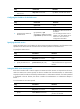
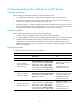
To set HWTACACS timers:
Ste
p
Command
Remarks
1. Enter system view.
system-view N/A
2. Enter HWTACACS scheme
view.
hwtacacs scheme
hwtacacs-scheme-name
N/A
3. Set the HWTACACS server
response timeout timer.
timer response-timeout seconds
By default, the HWTACACS server
response timeout timer is 5
seconds.
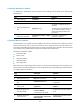
This command is not supported in
this software version and is
reserved for future support.