
R21xx-HP FlexFabric 11900 Security Configuration Guide

36
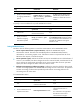
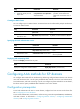
Step Command Remarks
2. Create an LDAP server and
enter its view.
ldap server server-name By default, no LDAP server exists.
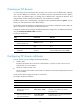
Configuring the IP address of the LDAP server
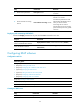
Step Command Remarks
1. Enter system view.
System-view N/A
2. Enter LDAP server view.
ldap server server-name N/A
3. Configure the IP address of
the LDAP server.
{ ip ip-address | ipv6
ipv6-address } [ port port-number ]
[ vpn-instance vpn-instance-name ]
By default, an LDAP server has no
IP address.
You can configure either an IPv4
address or an IPv6 address for an
LDAP server. The most recent
configuration takes effect.
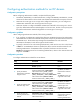
Specifying the LDAP version
Specify the LDAP version on the NAS. The device supports LDAPv2 and LDAPv3, and the LDAP version
specified on the device must be consistent with the version specified on the LDAP server.
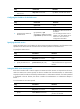
To specify the LDAP version:
Ste
p
Command
Remarks
1. Enter system view.
system-view N/A
2. Enter LDAP server view.
ldap server server-name N/A
3. Specify the LDAP version.
protocol-version { v2 | v3 }
By default, LDAPv3 is used.
A Microsoft LDAP server supports only
LDAPv3.
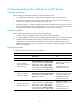
Setting the LDAP server timeout period
If the device sends a bind or search request to an LDAP server but receives no response from the server
within the LDAP server timeout period, the device considers that the authentication or authorization
request has timed out and tries the backup authentication or authorization method. If no backup method
is configured in the ISP domain, the device considers the authentication or authorization attempt a
failure.
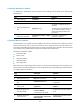
To set the LDAP server timeout period:
Ste
p
Command
Remarks
1. Enter system view.
system-view N/A
2. Enter LDAP server view.
ldap server server-name N/A
3. Set the LDAP server timeout
period.
server-timeout time-interval
By default, the LDAP server timeout
period is 10 seconds.