
R21xx-HP FlexFabric 11900 Security Configuration Guide

39
Creating an ISP domain
In a networking scenario with multiple ISPs, the device can connect to users of different ISPs, and these
users can have different user attributes, such as different username and password structures, different
service types, and different rights. To manage users of different ISPs, configure ISP domains, and
configure AAA methods and domain attributes for each ISP domain as needed.
The device supports up to 16 ISP domains, including the system predefined ISP domain system. You can
specify one of the ISP domains as the default domain.
On the device, each user belongs to an ISP domain. If a user provides no ISP domain name at login, the
device considers the user belongs to the default ISP domain.
To delete the ISP domain functioning as the default ISP domain, change it to a non-default ISP domain by
using the undo domain default enable command.
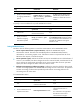
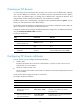
To create an ISP domain:
Ste
p
Command
Remarks
1. Enter system view.
system-view N/A
2. Create an ISP domain and
enter ISP domain view.
domain isp-name N/A
3. Return to system view.
quit N/A
4. (Optional.) Specify the default
ISP domain.
domain default enable
isp-name
By default, the default ISP domain is the
system predefined ISP domain system.
Configuring ISP domain attributes
In an ISP domain, you can configure the following attributes:
• Domain status:
By placing the ISP domain to the active or blocked state, you allow or deny network service
requests from users in the domain.
• Maximum number of online users:
The device controls the number of online users in a domain to ensure the system performance and
service reliability.
An ISP domain attribute applies to all users in the domain.
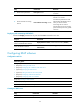
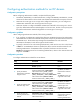
To configure ISP domain attributes:
Ste
p
Command
Remarks
1. Enter system view.
system-view N/A
2. Enter ISP domain view.
domain isp-name N/A
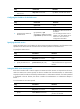
3. (Optional.) Place the ISP
domain to the active or
blocked state.
state { active | block }
By default, an ISP domain is in active state,
and users in the domain can request
network services.
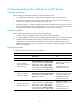
4. (Optional.) Specify the
maximum number of online
users in the ISP domain.
access-limit enable
max-user-number
By default, there is no limit to the maximum
number of online users.