
R21xx-HP FlexFabric 11900 Security Configuration Guide

45
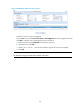
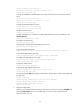
# Enable the default user role feature to assign authenticated SSH users the default user role
network-operator.
[Switch] role default-role enable
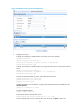
3. Verify the configuration:
When the user initiates an SSH connection to the switch and enter the correct username and
password, the user successfully logs in and can use the commands for the network-operator user
role.
AAA configuration examples
Unless otherwise noted, devices in the configuration examples are operating in non-FIPS mode.
Local authentication, HWTACACS authorization, and RADIUS
accounting for SSH users
Network requirements
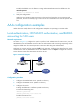
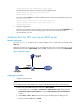
As shown in Figure 12, configure the switch to perform local authentication for SSH servers, use the
HWTACACS server and RADIUS server for SSH user authorization and accounting respectively, and to
assign the default user role network-operator to SSH users after they pass authentication.
Configure an account with the username hello for the SSH user. Configure the shared keys for secure
communication with the HWTACACS server and RADIUS server to expert. Configure the switch to
remove domain names from usernames sent to the servers.
Figure 12 Network diagram
Configuration procedure
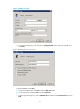
1. Configure the HWTACACS server. (Details not shown.)
2. Configure the RADIUS server. (Details not shown.)
3. Configure the switch:
# Assign IP addresses to interfaces. (Details not shown.)
# Create local RSA key pairs.
<Switch> system-view
[Switch] public-key local create rsa
# Enable the SSH service.
[Switch] ssh server enable