
R21xx-HP FlexFabric 11900 Security Configuration Guide

49
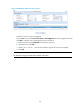
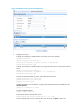
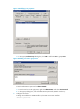
Figure 15 Adding an account for device management
2. Configure the switch:
# Assign an IP address to VLAN-interface 2, the SSH user access interface.
<Switch> system-view
[Switch] interface vlan-interface 2
[Switch-Vlan-interface2] ip address 192.168.1.70 255.255.255.0
[Switch-Vlan-interface2] quit
# Assign an IP address to VLAN-interface 3, through which the switch communicates with the
server.
[Switch] interface vlan-interface 3
[Switch-Vlan-interface3] ip address 10.1.1.2 255.255.255.0
[Switch-Vlan-interface3] quit
# Create local RSA and DSA key pairs, and enable the SSH service.
[Switch] public-key local create rsa
[Switch] public-key local create dsa
[Switch] ssh server enable
# Enable the default user role feature to assign authenticated SSH users the default user role
network-operator.
[Switch] role default-role enable
# Create a RADIUS scheme.
[Switch] radius scheme rad
# Specify the primary authentication server.
[Switch-radius-rad] primary authentication 10.1.1.1 1812
# Set the shared key for secure communication with the server to expert in plain text.