
R21xx-HP FlexFabric 11900 Security Configuration Guide

50
[Switch-radius-rad] key authentication simple expert
# Include the domain names in usernames sent to the RADIUS server.
[Switch-radius-rad] user-name-format with-domain
[Switch-radius-rad] quit
# Create ISP domain bbb and configure authentication and authorization methods for login users.
[Switch] domain bbb
[Switch-isp-bbb] authentication login radius-scheme rad
[Switch-isp-bbb] authorization login radius-scheme rad
[Switch-isp-bbb] quit
3. Verify the configuration:
When the user initiates an SSH connection to the switch and enter the username hello@bbb and
the correct password, the user successfully logs in and can use the commands for the
network-operator user role.
Authentication for SSH users by an LDAP server
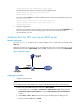
Network requirements
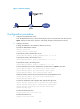
As shown in Figure 16, an LDAP server is at the IP address 10.1.1.1/24 and uses the domain name
ldap.com.
Configure the switch to use the LDAP server to authenticate SSH users. On the LDAP server, set the
administrator password to admin!123456, add user aaa, and set the user's password to ldap!123456.
Figure 16 Network diagram
Configuration procedure
1. Configure the LDAP server:
NOTE:
This example assumes that the LDAP server runs Microsoft Windows 2003 Server Active Directory.
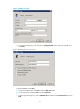
# Add a user named aaa and set the password to ldap!123456.
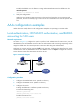
a. On the LDAP server, select Start > Control Panel > Administrative Tools, and double-click
Active Directory Users and Computers to open the Active Directory Users and Computers
window.
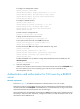
b. Select Action > New > User from the menu to open the dialog box for adding a user.
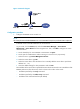
c. Enter the username aaa and click Next.