
R21xx-HP FlexFabric 11900 Security Configuration Guide

51
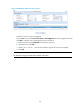
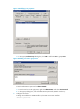
Figure 17 Adding user aaa
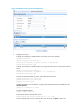
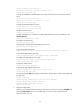
d. In the pop-up dialog box, enter the password ldap!123456, select options as needed, and
click Next.
Figure 18 Setting the user's password
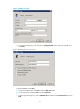
# Add user aaa to group Users.
a. From the navigation tree, click Users under the ldap.com node.
b. On the right pane, right-click aaa and select Properties.
c. From the pop-up dialog box, click the Member Of tab and then select Domain Users and click
Add.