
R21xx-HP FlexFabric 11900 Security Configuration Guide


82
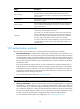
Ste
p
Command
Remarks
2. Enter public key view. public-key peer keyname N/A
3. Configure a client's host
public key.
Enter the content of the host public
key
When you enter the contents for a
host public key, you can use
spaces and carriage returns
between characters. When you
save the host public key, spaces
and carriage returns are removed
automatically.
For more information, see
"Managing public keys."
4. Return to system view.
peer-public-key end N/A
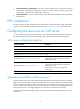
To import a client's host public key from a public key file:
Ste
p
Command
1. Enter system view.
system-view
2. Import a client's public key
from a public key file.
public-key peer keyname import sshkey filename
Configuring an SSH user
To configure an SSH user that uses publickey authentication, perform the procedure in this section.
To configure an SSH user that uses publickey authentication, you must create a local user that has the
same username as the SSH user to assign the working directory and user role.
To configure an SSH user that uses password authentication, whether together with publickey
authentication or not, you must configure a local user account by using the local-user command for local
authentication, or configure an SSH user account on an authentication server, for example, a RADIUS
server, for remote authentication. In either case, the local user or the SSH user configured for remote
authentication must have the same username as the SSH user.
For password-only SSH users, you do not need to perform the procedure in this section to configure them
unless you want to use the display ssh user-information command to display all SSH users, including the
password-only SSH users, for centralized management. If such an SSH user has been created, make sure
you have specified the correct service type and authentication method.
Configuration guidelines
When you perform the procedure in this section to configure an SSH user, follow these guidelines:
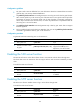
• An SSH server supports up to 1024 SSH users.
• For an SFTP or SCP user, the working directory depends on the authentication method:
{ If only password authentication is used, the working directory is authorized by AAA.
{ If publickey authentication, whether with password authentication or not, is used, the working
folder is specified by the authorization-attribute command in the associated local user view.
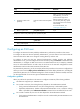
• For an SFTP or Stelnet user, the user role also depends on the authentication method:
{ If only password authentication is used, the user role is authorized by the remote AAA server or
the local device.