
R21xx-HP FlexFabric 11900 Security Configuration Guide

90
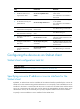
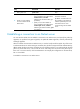
Task Command
Remarks
Terminate the connection with the
SFTP server and return to user view.
• bye
• exit
• quit
Use one of the commands.
Available in SFTP client view.
These three commands function in the
same way.
Configuring the device as an SCP client
This section describes how to configure the device as an SCP client and transfer files with an SCP server.
When an SCP client accesses an SCP server, it uses the locally saved host public key of the server to
authenticate the server. When acting as an SCP client, the device supports the first authentication by
default. When the device accesses an SCP server for the first time but it is not configured with the host
public key of the SCP server, it can access the server and locally save the server's host public key for
future use. In a secure network, the first authentication can simplify the configuration on the SFTP client,
but it is not reliable.
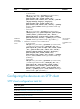
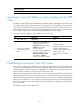
To transfer files with an SCP server: