
R21xx-HP FlexFabric 11900 Series High Availability Command Reference
102
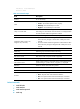
Related commands
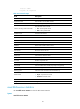
display track
track interface
Use track interface to create a track entry and associate it with the physical state of a specific interface.
Use undo track to remove the track entry.
Syntax
track track-entry-number interface interface-type interface-number [ delay { negative negative-time |
positive positive-time } * ]
undo track track-entry-number
Default
No track entry exists.
Views
System view
Predefined user roles
network-admin
Parameters
track-entry-number: Specifies the track entry ID in the range of 1 to 1024.
interface-type interface-number: Specifies an interface by its type and number.
delay: Specifies the amount of time the Track module waits before notifying the application modules that
the track entry state has changed. If this keyword is not specified, the Track module notifies the
application modules immediately when the track entry state changes.
negative negative-time: Specifies the amount of time the Track module waits before notifying the
application modules that the state of the track entry has changed to Negative. The negative-time
argument represents the delay time in the range of 1 to 300 seconds.
positive positive-time: Specifies the amount of time the Track module waits before notifying the
application modules that the state of the track entry has changed to Positive. The positive-time argument
represents the delay time in the range of 1 to 300 seconds.
Usage guidelines
When you create a track entry that is associated with the physical state of a specific interface, the state
of the track entry is Positive if the physical state of the interface is up. The state of the track entry is
Negative if the physical state of the interface is down. To display the physical state of an interface, use
the display ip interface brief command.
After a track entry is created, you can only use the track interface delay command to modify its
notification delay settings. To modify other settings, you must delete the entry and create a new one.
Examples
# Create track entry 1 and associate it with the physical state of VLAN-interface 10.
<Sysname> system-view
[Sysname] track 1 interface vlan-interface 10