
R21xx-HP FlexFabric 11900 Series High Availability Command Reference


30
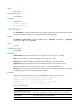
Default
The value of this field is 4 for all CCMs sent.
Views
System view
Predefined user roles
network-admin
Parameters
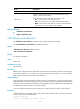
interval interval-value: Specifies the value of the interval field in CCM messages. The value range for the
interval field is 1 to 7. This Switch Series does not support an interval field value in the range of 1 to 3.
If you configure the interval field value as 1, 2, or 3, the value 4 takes effect.
service-instance instance-id: Specifies the service instance ID in the range of 1 to 32767.
Usage guidelines
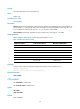
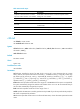
When setting the CCM interval, use the settings described in Table 6.
Table 6 CCM interval field encoding
CCM interval field
Transmission interval
Maximum CCM lifetime
1 10/3 milliseconds 35/3 milliseconds
2 10 milliseconds 35 milliseconds
3 100 milliseconds 350 milliseconds
4 1 second 3.5 seconds
5 10 seconds 35 seconds
6 60 seconds 210 seconds
7 600 seconds 2100 seconds
Examples
# Set the value of the interval field in CCMs sent by MEPs in service instance 2 to 7.
<Sysname> system-view
[Sysname] cfd cc interval 7 service-instance 2
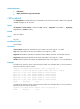
Related commands
cfd cc enable
cfd enable
Use cfd enable to enable CFD.
Use undo cfd enable to disable CFD.
Syntax
cfd enable
undo cfd enable
Default
CFD is disabled.