
R21xx-HP FlexFabric 11900 Series High Availability Command Reference
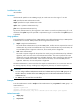
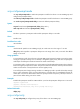
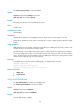
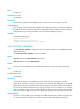

75
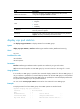
Field Descri
p
tion
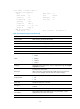
VRRP Track Information
Track entry information. This field is displayed only after you have
configured the vrrp ipv6 vrid track command.
Track Object Track entry which is associated with the VRRP group.
State
Track entry state:
• Negative.
• Positive.
• NotReady.
Pri Reduced
Value by which the priority decreases when the status of the associated
track entry becomes negative.
Switchover
Switchover mode. When the status of the associated track entry becomes
negative, the backup immediately becomes the master.
display vrrp ipv6 statistics
Use display vrrp ipv6 statistics to display statistics for IPv6 VRRP groups.
Syntax
display vrrp ipv6 statistics [ interface interface-type interface-number [ vrid virtual-router-id ] ]
Views
Any view
Predefined user roles
network-admin
network-operator
Parameters
interface interface-type interface-number: Specifies an interface by its type and number.
vrid virtual-router-id: Specifies an IPv6 VRRP group by its virtual router ID in the range of 1 to 255.
Usage guidelines
If no interface or VRRP group is specified, this command displays statistics for all IPv6 VRRP groups. If
only an interface is specified, this command displays statistics for all IPv6 VRRP groups on the specified
interface. If both an interface and an IPv6 VRRP group are specified, this command displays statistics for
the specified IPv6 VRRP group on the specified interface.
You can use the reset vrrp ipv6 statistics command to clear statistics for IPv6 VRRP groups.
Examples
# Display statistics for all IPv6 VRRP groups when VRRP operates in standard mode.
<Sysname> display vrrp ipv6 statistics
Interface : Vlan-interface2
VRID : 1
CheckSum Errors : 0 Version Errors : 0
Invalid Pkts Rcvd : 0 Unexpected Pkts Rcvd : 0
Hop Limit Errors : 0 Advertisement Interval Errors : 0