
R21xx-HP FlexFabric 11900 Series High Availability Command Reference

79
Usage guidelines
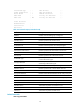
VRRP determines the role (master or backup) of each router in a VRRP group by priority. A router with a
higher priority is more likely to become the master.
The VRRP priority is in the range of 0 to 255. A greater number represents a higher priority. Priorities 1
to 254 are configurable. Priority 0 is reserved for special uses, and priority 255 is for the IP address
owner. The router acting as the IP address owner in a VRRP group always has a running priority of 255
and acts as the master as long as it operates correctly.
Examples
# Configure the priority of the device in VRRP group 1 on VLAN-interface 2 as 150.
<Sysname> system-view
[Sysname] interface vlan-interface 2
[Sysname-Vlan-interface2] vrrp ipv6 vrid 1 priority 150
Related commands
display vrrp ipv6
vrrp ipv6 vrid shutdown
Use vrrp ipv6 vrid shutdown to disable an IPv6 VRRP group.
Use undo vrrp ipv6 vrid shutdown to restore the default.
Syntax
vrrp ipv6 vrid virtual-router-id shutdown
undo vrrp ipv6 vrid virtual-router-id shutdown
Default
An IPv6 VRRP group is enabled.
Views
Interface view
Predefined user roles
network-admin
Parameters
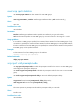
virtual-router-id: Specifies an IPv6 VRRP group by its virtual router ID in the range of 1 to 255.
Usage guidelines
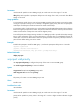
You can use this command to temporarily disable an IPv6 VRRP group. After this command is configured,
the VRRP group stays in initialized state, and its configurations remain unchanged. You can change its
configuration, and your changes take effect when you enable the VRRP group again.
Examples
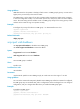
# Disable IPv6 VRRP group 1.
<Sysname> system-view
[Sysname] interface vlan-interface 2
[Sysname-Vlan-interface2] vrrp ipv6 vrid 1 shutdown