
R21xx-HP FlexFabric 11900 TRILL Configuration Guide

11
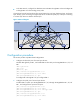
• In the TRILL network, configure four distribution trees with RB 6 through RB 9 as the root bridges. RB
6 through RB 9 are in descending priority order.
A hierarchical network has three layers (from top to bottom): the core layer, distribution layer, and access
layer. Usually, a port connecting to a higher layer device is called an uplink port, and a port connecting
to a lower layer device is called a downlink port.
Figure 4 Network diagram
Configuration procedure
This section provides only TRILL-related configurations.
1. Configure the downlink ports of access layer devices:
# Enable TRILL globally on RB 1, and enable TRILL on downlink port Ten-GigabitEthernet 1/0/1 of
RB 1.
<RB1> system-view
[RB1] trill
[RB1-trill] quit
[RB1] interface ten-gigabitethernet 1/0/1
[RB1-Ten-GigabitEthernet1/0/1] trill enable
[RB1-Ten-GigabitEthernet1/0/1] quit
# Configure RB 2 through RB 5 as you configured RB 1.
2. Configure the uplink port of access layer devices:
# Enable TRILL on uplink port Ten-GigabitEthernet 1/0/2 through Ten-GigabitEthernet 1/0/5 of
RB 1, and configure these ports as trunk ports.
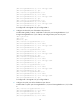
[RB1] interface ten-gigabitethernet 1/0/2
[RB1-Ten-GigabitEthernet1/0/2] trill enable
[RB1-Ten-GigabitEthernet1/0/2] trill link-type trunk
[RB1-Ten-GigabitEthernet1/0/2] quit
[RB1] interface ten-gigabitethernet 1/0/3
[RB1-Ten-GigabitEthernet1/0/3] trill enable
Distribution layer
Access
layer
RB 6 RB 7 RB 8
RB 1 RB 2 RB 3 RB 4 RB 5
RB 9
Core layer
TRILL network