
R21xx-HP FlexFabric 11900 TRILL Configuration Guide

5
TRILL configuration task list
When you configure TRILL, follow these guidelines:
• Configuration in Layer 2 Ethernet interface view takes effect on only the current port. Configuration
in Layer 2 aggregate interface view takes effect on the current interface and its member ports.
Configuration on the member port of an aggregate interface takes effect after the member port
leaves the aggregation group.
• When both TRILL and a spanning tree protocol are enabled on a port, TRILL processes the BPDUs
received on the port. To make sure the STP network can properly interoperate with the TRILL network,
disable the spanning tree protocol on TRILL ports. For more information about spanning tree
protocols, see Layer 2—LAN Switching Configuration Guide.
• HP recommends not enabling loop detection on TRILL ports, because TRILL networks prevent loops
from being generated. For more information about loopback detection, see Layer 2—LAN
Switching Configuration Guide.
• Do not configure the TPID for VLAN tags on RBs. For more information about TPIDs, see Layer 2
—
LAN Switching Configuration Guide.
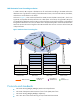
• Do not connect multiple TRILL ports on an RB to the same link. Otherwise, these TRILL ports might be
elected as the AVFs of a VLAN at the same time because these TRILL ports cannot sense each other.
As a result, loops will occur in the VLAN.
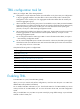
Complete the following tasks to configure TRILL:
Tasks at a
g
lance
(Required.) Enabling TRILL
(Optional.) Configuring the link type of a TRILL port
(Optional.) Configuring the DRB priority of a TRILL port
(Optional.) Configuring TRILL timers
(Optional.) Adjusting LSP parameters
(Optional.) Configuring distribution tree parameters
(Optional.) Enabling logging of TRILL neighbor changes
(Optional.) Configuring TRILL GR
Enabling TRILL
To enable TRILL on a port, first enable TRILL globally.
When you set up a network and perform configurations, avoid the case that ports in a VLAN have
different TRILL states (enabled or disabled).
Do not enable both TRILL and EVB on a port. The allowed VLAN list of a TRILL-enabled port cannot
overlap with that of an EVB-enabled port. For more information about EVB, see EVB Configuration
Guide.
After you enable TRILL on a port, TRILL can operate normally by using default settings. A port with TRILL
enabled is called a "TRILL port."