
R2507P22-HP 11900/10500/7500 20G Unified Wired-WLAN Module Basic Configuration Guide

1
Configuring basic settings for the HP
11900/10500/7500 20G unified
wired-WLAN module
Support for this feature may vary depending on your device model. For more information, see About the
Configuration Guides for HP Unified Wired-WLAN Products.
The HP 11900/10500/7500 20G unified wired-WLAN module is only applicable to the HP
7502/7503/7503-S/7506/7506-V/7510, HP 10504/10508/10508-V/10512 switches, and HP
FlexFabric 11900 switch series.
Do not execute the shutdown command on the Ethernet interface that connects the switch to the
11900/10500/7500 20G unified wired-WLAN module.
Configuring basic settings
An HP 11900/10500/7500 20G unified wired-WLAN module installed in the expansion slot on the
switch is connected to the switch through internal interfaces of the switch. To enable the switch to
collaborate with the module, configure the interfaces on the switch.
Configuring the internal interfaces of the switch
Follow these guidelines when you configure the internal interfaces of the switch:
• The numbers of the internal interfaces connecting the switch to the module depend on the slot where
the module is seated. For example, in slot 2, the two internal interfaces are numbered XGE 2/0/1
and XGE 2/0/2.
• The manual link aggregation approach must be adopted.
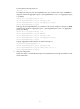
• For the configuration commands of the switch, see the manual of the switch.
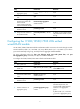
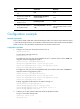
To configure the internal interfaces of the switch:
Ste
p
Command
Remarks
1. Enter system view.
system-view N/A
2. Create VLANs and enter
VLAN view.
vlan { vlan-id1 [ to vlan-id2 ] | all }
By default, the only one default
VLAN VLAN 1 exists.
3. Exit from VLAN view.
quit N/A
4. Enter view of the interface that
connects the switch to the HP
11900/10500/7500 20G
unified wired-WLAN module.
interface interface-type
interface-number
N/A
5. Set the link type of the
interface to trunk.
port link-type trunk N/A