
R2507P22-HP 11900/10500/7500 20G Unified Wired-WLAN Module Basic Configuration Guide

2
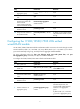
Ste
p
Command
Remarks
6. Add the interface to an
aggregation group.
port link-aggregation group
number
N/A
7. Exit from Ethernet interface
view.
quit N/A
8. Enter view of the aggregate
interface that connects the
switch to the HP
11900/10500/7500 20G
unified wired-WLAN module.
interface bridge-aggregation
interface-number
N/A
9. Set the link type of the
interface to trunk.
port link-type trunk N/A
10. Assign the trunk interface to
the specified VLANs.
port trunk permit vlan { vlan-list |
all }
By default, a trunk interface allows
only packets from VLAN 1 to pass
through.
Configuring the 11900/10500/7500 20G unified
wired-WLAN module
An HP 11900/10500/7500 20G unified wired-WLAN module connects to the switch through two XGE
internal interfaces, XGE 1/0/1 and XGE 1/0/2. By default, XGE 1/0/1 is up, XGE 1/0/2 is down
(you need to manually bring it up), and they form the aggregate interface BAGG1.
For more information about the vlan, port link-type trunk, port trunk permit vlan, and port
link-aggregation group commands, see Layer 2 Command Reference.
To configure the 11900/10500/7500 20G unified wired-WLAN module:
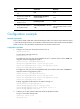
Ste
p
Command
Remarks
1. Enter system view.
system-view N/A
2. Create VLANs and enter
VLAN view.
vlan { vlan-id1 [ to vlan-id2 ] | all }
By default, the only one default
VLAN VLAN 1 exists.
3. Exit from VLAN view.
quit N/A
4. Enter view of the interface that
connects the module to the
switch.
interface interface-type
interface-number
N/A
5. Set the link type of the
interface to trunk.
port link-type trunk N/A
6. Add the interface to an
aggregation group.
port link-aggregation group
number
Optional.
Executed multiple times, this
command adds multiple Ethernet
interfaces to an aggregation
group.
By default, XGE 1/0/1 and XGE
1/0/2 are in aggregation group
1.