
Quick Start Guide




3
Taking pictures
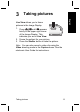
Live View allows you to frame
pictures in the Image Display.
1.
Press
until appears
briefly in the upper right corner
of the Image Display. This
indicates you are in Live View.
2. Frame the subject for your picture.
3. Press the Shutter button to take the picture.
Note You can also record a video clip using the
Video shooting mode in the Capture menu. See the
electronic User Guide for instructions.
Taking pictures 13
English